MikroTik – RouterOS v7
IPv4 + IPv6 (PD) + Full L3 Isolation + DNS + Management (Real Setup)
My Environment
- Upstream Router: FritzBox 7530
- FRITZ!OS: 8.20 / 8.21
- MikroTik: hEX S
- RouterOS: 7.22.1
- ISP: Telekom Deutschland with /56 Prefix
- IPv6: Prefix Delegation from FritzBox
- RouterOS base: default config with working IPv4 subnet + NAT
This setup is tested and working.
Network diagram
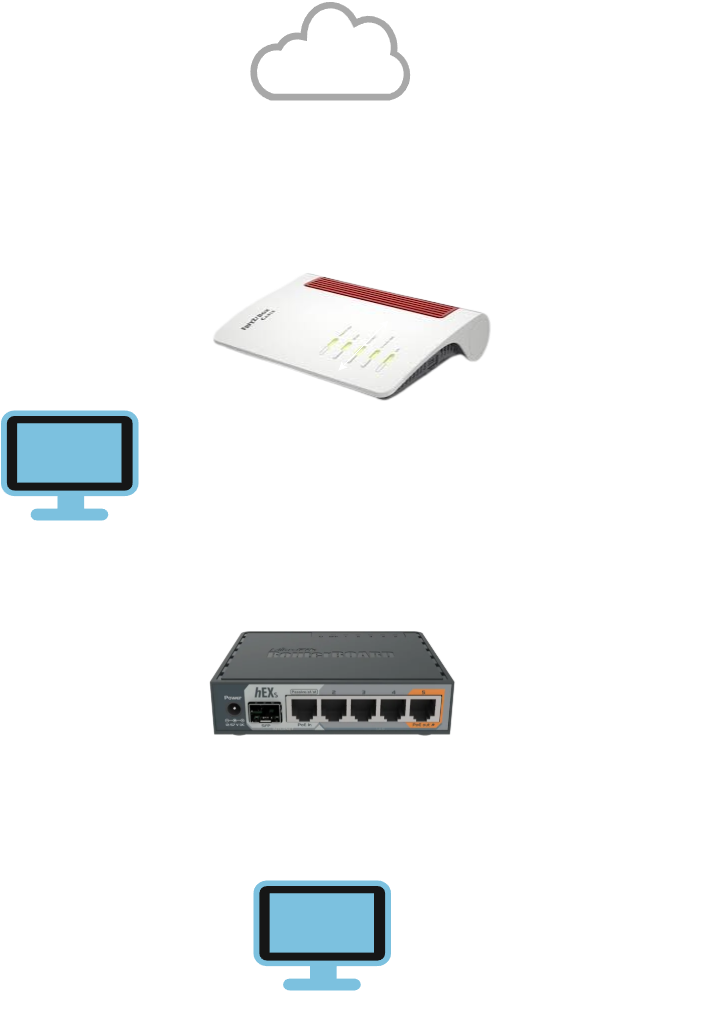
Goal
- IPv4 works
- IPv6 works
- IPv6 Prefix Delegation works
- LAN can access Internet
- FritzBox LAN cannot access MikroTik LAN
- MikroTik LAN cannot access FritzBox LAN
- Only management access from FritzBox LAN to MikroTik itself is allowed
- DNS works
Network Idea
bridge= your internal LANether1= upstream / FritzBox / WAN
Core Concept (VERY IMPORTANT)
Firewall rules work:
- top → bottom
- first match wins
- rule order is critical
If rule order is wrong, the whole setup breaks.
Step 1 – IPv6 Prefix Delegation
/ipv6 dhcp-client add interface=ether1 request=prefix pool-name=ipv6_pool add-default-route=yes
What it does
- gets an IPv6 prefix from FritzBox
- creates the pool
ipv6_pool - installs the IPv6 default route
Step 2 – IPv6 Addresses
# Stable internal IPv6 network (ULA)
/ipv6 address add address=fd00:1::1/64 interface=bridge advertise=yes

# Dynamic global IPv6 from FritzBox PD
/ipv6 address add from-pool=ipv6_pool interface=bridge advertise=yes
Why this is good
fd00:1::1/64= stable internal IPv6 for your LANfrom-pool=ipv6_pool= dynamic global IPv6 for Internet access- both on the same LAN interface is normal
Important
- ULA = your stable internal network
- GUA = Internet connectivity
- no static global prefix is needed
Step 3 – DNS
/ip dns set servers=1.1.1.1,8.8.8.8,2606:4700:4700::1111,2001:4860:4860::8888 allow-remote-requests=yes

/ip dhcp-server network set [ find ] dns-server=192.168.88.1

/ipv6 nd set [ find interface=bridge ] advertise-dns=yes
What it does
- MikroTik uses Cloudflare and Google as upstream DNS
- IPv4 clients get MikroTik as DNS server
- IPv6 clients also learn DNS through Router Advertisement
- clients use MikroTik as local DNS resolver
Step 4 – IPv4 Firewall
INPUT chain (traffic to the MikroTik itself)
/ip firewall filter
add chain=input action=accept connection-state=established,related comment="Allow established and related"
add chain=input action=accept protocol=icmp comment="Allow ICMP"
add chain=input action=accept src-address=192.168.178.0/24 comment="Allow management from FritzBox LAN"
add chain=input action=drop comment="Drop everything else"
Explanation
Rule 1
add chain=input action=accept connection-state=established,related
Allows replies to existing connections.
Example:
- you connect to the router
- reply traffic must be allowed back
Without this, many things break.
Rule 2
add chain=input action=accept protocol=icmp
Allows ping and important IPv4 control traffic.
Good for testing and troubleshooting.
Rule 3
add chain=input action=accept src-address=192.168.178.0/24
This is the management exception.
It means:
- devices in FritzBox LAN may access the MikroTik itself
- this is only for router access
- it does not allow access to LAN clients behind MikroTik
This is exactly what you wanted.
Rule 4
add chain=input action=drop
Blocks all other traffic to the MikroTik itself.
That means:
- Internet cannot access router
- LAN cannot access router unless explicitly allowed
- only FritzBox LAN management stays allowed
FORWARD chain (traffic going through the router)
add chain=forward action=accept connection-state=established,related comment="Allow established and related"
add chain=forward action=accept in-interface=bridge out-interface=ether1 comment="Allow LAN to Internet"
add chain=forward action=drop in-interface=bridge dst-address=192.168.178.0/24 comment="Block LAN to FritzBox LAN"
add chain=forward action=drop in-interface=ether1 out-interface=bridge comment="Block FritzBox/WAN to LAN"
add chain=forward action=drop comment="Drop everything else"
Explanation
Rule 1
add chain=forward action=accept connection-state=established,related
Allows reply traffic for forwarded connections.
Example:
- LAN client opens website
- website replies
- reply traffic is allowed back
Rule 2
add chain=forward action=accept in-interface=bridge out-interface=ether1
Allows LAN clients to access the Internet.
This is your normal outgoing traffic rule.
Rule 3
add chain=forward action=drop in-interface=bridge dst-address=192.168.178.0/24
Blocks MikroTik LAN from reaching FritzBox LAN.
So your isolated LAN cannot talk to devices in the upstream network.
Rule 4
add chain=forward action=drop in-interface=ether1 out-interface=bridge
Blocks FritzBox LAN / WAN from reaching your MikroTik LAN.
This is the real L3 isolation rule from upstream to downstream.
Rule 5
add chain=forward action=drop
Drops everything not explicitly allowed.
This is your default deny rule.
Step 5 – IPv6 Firewall
VERY IMPORTANT
IPv6 has:
- no NAT protection
- globally routable addresses
- firewall is mandatory
If you do not configure IPv6 firewall, your isolation is incomplete.
INPUT chain (traffic to the MikroTik itself)
/ipv6 firewall filter
add chain=input action=accept connection-state=established,related comment="Allow established and related"
add chain=input action=accept protocol=icmpv6 comment="Allow ICMPv6"
add chain=input action=accept in-interface=ether1 comment="Allow upstream management and required upstream IPv6 traffic"
add chain=input action=drop comment="Drop everything else"
Explanation
Rule 1
add chain=input action=accept connection-state=established,related
Allows replies to existing IPv6 connections.
Rule 2
add chain=input action=accept protocol=icmpv6
This is required.
ICMPv6 is needed for:
- Neighbor Discovery
- Router Advertisement
- Path MTU Discovery
- general IPv6 operation
Without this, IPv6 breaks.
Rule 3
add chain=input action=accept in-interface=ether1
This allows upstream access to the MikroTik itself over IPv6.
Important:
- this is the IPv6 management exception
- it allows FritzBox-side access to the router itself
- it does not allow upstream access to LAN clients
- LAN clients are still protected by the FORWARD chain
This matches your goal:
- FritzBox LAN → MikroTik = allowed
- FritzBox LAN → MikroTik LAN = blocked
Rule 4
add chain=input action=drop
Drops all other IPv6 traffic to the MikroTik itself.
FORWARD chain (traffic going through the router)
add chain=forward action=accept connection-state=established,related comment="Allow established and related"
add chain=forward action=accept in-interface=bridge out-interface=ether1 comment="Allow LAN to Internet"
add chain=forward action=drop in-interface=ether1 out-interface=bridge comment="Block upstream to LAN"
add chain=forward action=drop comment="Drop everything else"
Explanation
Rule 1
add chain=forward action=accept connection-state=established,related
Allows reply traffic for IPv6 connections.
Rule 2
add chain=forward action=accept in-interface=bridge out-interface=ether1
Allows MikroTik LAN to access the Internet over IPv6.
No static prefix rule needed.
This works by interface direction.
Rule 3
add chain=forward action=drop in-interface=ether1 out-interface=bridge
Blocks all upstream IPv6 traffic from reaching your LAN.
This is the IPv6 isolation rule.
This replaces the “NAT feeling” people are used to with IPv4.
Rule 4
add chain=forward action=drop
Drops everything not explicitly allowed.
Step 6 – DNS Access to MikroTik
IPv4 DNS access from LAN
/ip firewall filter add chain=input action=accept protocol=udp dst-port=53 in-interface=bridge comment="Allow IPv4 DNS UDP from LAN"
 /ip firewall filter add chain=input action=accept protocol=tcp dst-port=53 in-interface=bridge comment="Allow IPv4 DNS TCP from LAN"
IPv6 DNS access from LAN
/ipv6 firewall filter add chain=input action=accept protocol=udp dst-port=53 in-interface=bridge comment="Allow IPv6 DNS UDP from LAN"
 /ipv6 firewall filter add chain=input action=accept protocol=tcp dst-port=53 in-interface=bridge comment="Allow IPv6 DNS TCP from LAN"
Why this is needed
Because clients use MikroTik as DNS resolver.
Without these rules, DNS requests from LAN to the router may be blocked.
Step 7 – Management Access (CRITICAL)
Firewall alone is not enough.
On MikroTik, services can also be bound to specific networks.
So even if firewall allows access, Winbox or SSH may still not work if services are not bound correctly. This point is already correctly recognized in your source guide.
Check services
/ip service print
Bind services to FritzBox LAN
/ip service set winbox address=192.168.178.0/24
/ip service set ssh address=192.168.178.0/24
/ip service set www address=192.168.178.0/24
/ip service set www-ssl address=192.168.178.0/24
What this does
- Winbox only listens for FritzBox LAN
- SSH only listens for FritzBox LAN
- WebFig only listens for FritzBox LAN
- no exposure to other networks
This is exactly the correct management design:
- FritzBox LAN can manage MikroTik
- isolated LAN behind MikroTik cannot manage it
- WAN/Internet cannot manage it
Very Important Rules
NEVER do this
block fe80::/10
That breaks IPv6.
fe80::/10 is link-local IPv6 and needed for normal IPv6 operation. Your source guide correctly warns about this.
ALWAYS allow this
protocol=icmpv6
Without ICMPv6, IPv6 becomes unstable or breaks.
Always keep this rule order
- established,related
- allow required traffic
- block unwanted traffic
- final drop
If the final drop is too early, everything breaks.
Testing
From MikroTik LAN
ping 8.8.8.8
ping -6 google.com
nslookup google.com
Expected:
- IPv4 Internet works
- IPv6 Internet works
- DNS works
From MikroTik LAN to FritzBox LAN
ping 192.168.178.1
Expected:
- blocked
This confirms IPv4 isolation.
From FritzBox LAN
Expected:
- Winbox to MikroTik = works
- SSH to MikroTik = works
- WebFig to MikroTik = works if enabled
- access to MikroTik LAN clients = blocked
This confirms the management exception is working correctly.
Final Result
- IPv4 works
- IPv6 works
- IPv6 Prefix Delegation works
- DNS works
- MikroTik LAN → Internet = allowed
- MikroTik LAN → FritzBox LAN = blocked
- FritzBox LAN → MikroTik LAN = blocked
- FritzBox LAN → MikroTik itself = allowed
- no broken IPv6
- no static IPv6 prefix hacks needed
Simple Truth
IPv4:
NAT protects you a little
IPv6:
YOU are the firewall